Introduction to micro:bit: Learning Programming Through Fun Projects
Getting Started with Micro:Bit
The micro:bit is a small yet powerful programmable device created to make learning coding simple, practical, and enjoyable, especially for beginners and young learners. It helps learners understand how computer programs interact with real-world components by combining software instructions with built-in hardware features.
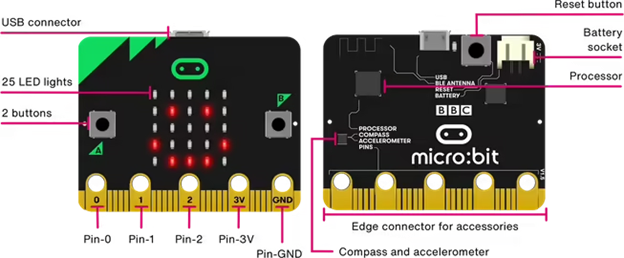
Although the micro:bit is compact, it includes several important components such as LED lights, buttons, sensors, and sound features. These components allow learners to create interactive projects that respond to actions like pressing a button, shaking the device, or changing its position. This makes learning more engaging because students can immediately see the result of their code.
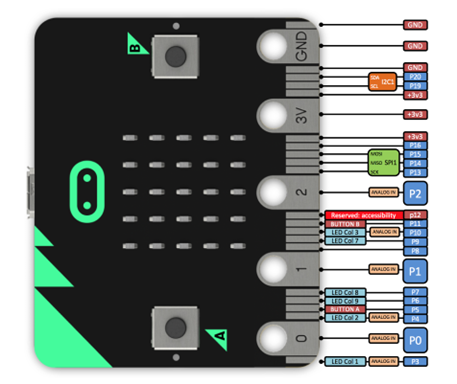
The micro:bit contains a 5 by 5 grid of LEDs that can display images, symbols, numbers, and animations. It also has two main buttons that can be programmed to perform different actions. In addition, built-in sensors allow the device to detect movement, direction, light intensity, temperature, and sound. The micro:bit can be powered using a USB cable connected to a computer or a battery pack, making it portable and suitable for use in classrooms, labs, or at home.
One of the biggest advantages of the micro:bit is that learners can begin programming even without owning the physical device. The MakeCode simulator provides a virtual micro:bit that behaves just like the real one. This allows learners to experiment, test ideas, and learn programming concepts without any hardware limitations.
Why Learning with Micro:Bit Makes Coding Enjoyable
For many beginners, traditional programming feels difficult because it focuses mainly on text and abstract concepts. The micro:bit makes coding easier to understand by turning programs into visible actions. When learners write code, they immediately see lights turn on, images appear, or actions respond to movement and button presses.
This direct feedback helps learners understand that coding is simply about giving clear instructions to a device. If the instructions are correct, the device behaves as expected. If not, learners can easily modify the code and try again. This process builds confidence and encourages experimentation.
The visual programming environment also reduces fear and frustration. Instead of memorising complex rules, learners can focus on understanding logic, patterns, and problem-solving. Over time, this improves logical thinking, creativity, and analytical skills. As learners grow more confident, they can gradually move to more advanced programming languages.
Expressing Feelings with a Digital Emotional Badge

Creating a digital emotional badge is one of the most engaging beginner projects using the micro:bit. This project allows learners to express their feelings through images displayed on the LED grid.
In this activity, learners select or design an image that represents their mood, such as happy, calm, excited, or tired. When the program starts, the selected image appears on the micro:bit’s LED display. Learners can enhance the project by adding timing and repetition so that the image blinks or changes, making it more expressive and interactive.
This project introduces important programming concepts such as program execution, display control, and repetition. It also encourages creativity and self-expression, helping learners see technology as a tool for communication, not just calculation.
Building a Digital Dice That Responds to Movement

Turning the micro:bit into a digital dice is a fun and practical way to introduce randomness and motion detection. This project uses the micro:bit’s ability to sense movement through its built-in accelerometer.
When the micro:bit is shaken, the program generates a random number between one and six and displays it on the LED grid. Each shake produces a different result, just like rolling a real dice during a board game.
Through this project, learners understand how physical actions can trigger digital responses. They also learn how randomness works in programming and how simple logic can be used to create interactive and entertaining tools.
Tracking Daily Movement with a Step Counter
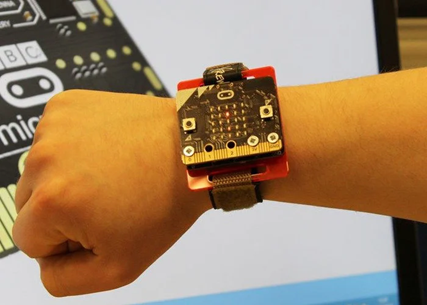
The step counter project helps learners explore how motion sensors are used in real-life devices such as fitness trackers and smartwatches. In this project, the micro:bit counts steps as the user walks.
Each time the micro:bit detects a movement pattern that resembles a step, the program increases a counter. This value is stored and updated continuously. The total number of steps can be displayed on the LED grid, often when a button is pressed.
This project introduces the concept of variables, which are used to store and manage data in a program. Learners also understand how data is collected, processed, and displayed. By connecting programming to everyday applications, this project makes learning more meaningful and relatable.
Creating a Classic Game: Stone, Paper, and Scissors
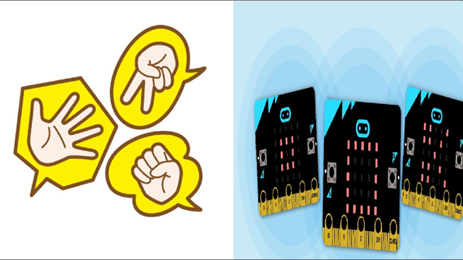
The stone, paper, and scissors project transforms a familiar game into an interactive digital experience. Because most learners already know the rules of the game, it becomes easier to focus on understanding how the program works.
When the user presses a button or shakes the micro: bit, the program randomly selects stone, paper, or scissors and displays the corresponding image on the LED grid. Since the selection changes every time, the game remains unpredictable and fun.
This project teaches decision-making, random selection, and handling user input. It also introduces the basic logic behind game development, helping learners understand how simple rules and conditions can create engaging digital experiences.
Designing a Simple Tilt-Based Safety Alarm
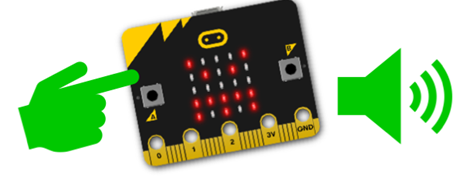
The tilt-based safety alarm project demonstrates how the micro: bit can be used as a basic alert or security system. This project focuses on detecting changes in the device’s position.
The micro:bit constantly monitors its orientation. When it is tilted beyond a certain angle, the program triggers an alert by displaying an image or producing a sound. The alert continues as long as the device remains tilted.
This activity helps learners understand condition-based programming, where actions occur only when specific conditions are met. It also introduces real-world applications such as alarms and monitoring systems, helping learners see how technology is used for safety and security.
Learning and Experimenting with MakeCode
MakeCode provides a beginner-friendly and visual environment for programming the micro: bit. Learners use colourful blocks that snap together, making it easy to build complete programs without worrying about syntax errors.
The built-in simulator allows learners to test their programs instantly. This immediate feedback helps them identify mistakes and improve their code quickly. As learners gain confidence, they can explore advanced features or switch to text-based programming, all within the same platform.
Conclusion
The micro: bit makes learning programming approachable, interactive, and meaningful. By working on projects such as emotional badges, digital dice, step counters, games, and tilt alarms, learners develop a strong foundation in programming concepts while enjoying the learning process.
These hands-on projects bridge the gap between theory and real-world application. As a result, the micro: bit serves as an excellent starting point for anyone beginning their journey into coding and technology.
Learn More about: STEM Education