
How to Build an Arduino-Based Alarm System Using a Motion Sensor and a Buzzer
With the growing need for affordable and customizable electronic solutions, microcontroller-based projects have gained significant popularity among students, hobbyists, and engineers. One such practical and beginner-friendly project is an Arduino-based alarm system that uses a motion sensor and a buzzer to detect movement and provide instant alerts. This project demonstrates how simple electronic components can be effectively combined to build a reliable alert mechanism for monitoring activity in each area.
This blog explains the complete working principle, hardware setup, and software logic behind an Arduino motion sensor alarm, making it suitable for academic projects, DIY enthusiasts, and entry-level Arduino security project implementations.
Concept Behind the Project
The core idea of this project is to detect human movement and respond immediately with an alarm. Human bodies emit infrared radiation due to body heat. A PIR sensor detects variations in this radiation when a person enters its field of view. Once motion is sensed, the Arduino processes the signal and activates a buzzer to alert nearby users.
This simple interaction between a sensor, controller, and output device forms the backbone of many real-world security and automation systems.
Key Components and Their Functions
The PIR Motion Sensor
The PIR motion sensor is the core sensing component of the system. It consists of three main parts: a Fresnel lens, an infrared sensor, and signal processing circuitry. The Fresnel lens focuses infrared radiation from the surrounding environment onto the sensor element.
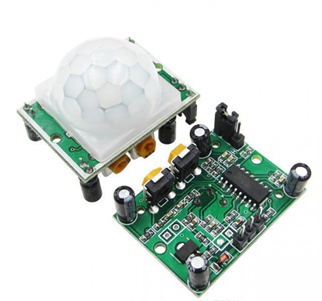
Human bodies naturally emit infrared radiation due to body heat. When a person enters the detection zone of the sensor, the infrared levels change. The sensor detects this change and outputs a digital HIGH signal. Typically, the detection range of a PIR sensor is about 6 to 7 meters, making it suitable for room-level intrusion detection.
Most PIR sensors include adjustable potentiometers that allow users to control sensitivity and delay time. Sensitivity determines how easily motion is detected, while delay time defines how long the output signal remains HIGH after motion is sensed.
Arduino Microcontroller
The Arduino acts as the control unit of the alarm system. It continuously monitors the output of the PIR motion sensor and executes predefined instructions when motion is detected. The Arduino board processes the sensor signal and controls the buzzer accordingly.
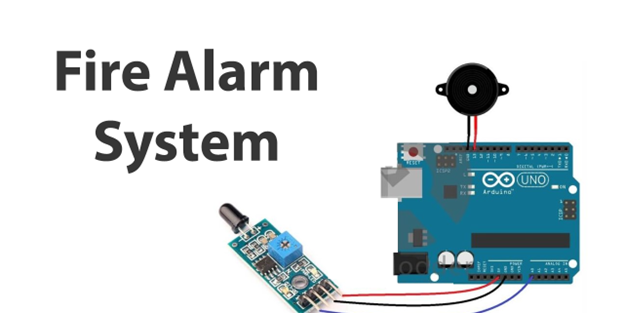
In this Arduino security project, an external interrupt is used to ensure an immediate response. Interrupts allow the microcontroller to stop its current task and handle time-critical events such as intrusion detection. This makes the system more responsive compared to simple polling methods.
The Buzzer
The buzzer is the output device that generates the alarm sound. A piezoelectric buzzer is commonly used for its low power consumption and ease of control. When driven by the Arduino, the buzzer produces sound by vibrating at specific frequencies.
In this Arduino buzzer project, pulse-width modulation signals are used to produce varying tones, resulting in a siren-like alarm. PWM allows precise control over sound frequency and duration, making the alert noticeable and effective.
Components Required
To build the Arduino-based alarm system, the following components are required:
- Arduino Uno or compatible microcontroller board
- PIR motion sensor
- Piezo buzzer
- Jumper wires
- Breadboard (optional)
- USB cable for programming
All these components are easily available and affordable, making this project ideal for students and beginners.
Circuit Connections
The hardware connections for this Arduino motion sensor alarm are straightforward.
The PIR motion sensor has three pins:
- VCC is connected to the Arduino 5V pin
- GND is connected to the Arduino ground
- OUT is connected to Arduino digital pin 2
Digital pin 2 is chosen because it supports external interrupts, which ensures an immediate response when motion is detected.
The buzzer connections are as follows:
- The negative terminal of the buzzer is connected to Arduino GND
- The positive terminal is connected to Arduino digital pin 9
Pin 9 supports PWM output, which is essential for generating sound patterns.
Once these connections are completed, the hardware setup is ready for programming.
Software Logic and Program Flow
The Arduino program begins by initialising the serial communication and configuring the sensor and buzzer pins. An interrupt is attached to the PIR sensor output pin. When the sensor detects motion and outputs a HIGH signal, the interrupt service routine is triggered.
Inside this interrupt function, the Arduino performs the following tasks:
- Displays an intrusion alert message on the serial monitor
- Activates the buzzer by generating PWM signals
- Repeats the alarm sequence for a fixed duration
The siren effect is created by alternating frequencies and delays, which enhances the alert mechanism. After the alarm sequence is completed, the system waits for the sensor output to return to LOW before detecting new motion.
This logic ensures that the alarm does not continuously trigger for the same movement and behaves predictably.
Calibration and Testing
After uploading the code to the Arduino, the PIR sensor requires a calibration period of approximately one minute. During this time, the sensor adjusts to the ambient infrared levels in the environment.
Once calibration is complete, testing can be performed by moving within the detection range of the sensor. When motion is detected:
- The buzzer produces an alarm sound
- An intrusion message appears on the serial monitor
When no motion is present, the sensor output becomes LOW, and the system returns to idle mode. Adjusting the sensor’s sensitivity and delay time helps achieve optimal performance based on room size and application requirements.
Applications of the Alarm System
This DIY alarm system has a wide range of applications, including:
- Home intrusion detection
- Office and laboratory security
- Restricted area monitoring
- Automated lighting control
- Entry-level smart home systems
As a modular Arduino security project, it can be expanded by integrating additional components such as GSM modules for SMS alerts, Wi-Fi modules for remote monitoring, LCDs for status indication, or cameras for visual surveillance.
Advantages of the System
The Arduino-based alarm system offers several advantages:
- Low cost and easy implementation
- Real-time motion detection
- Expandable and customizable design
- Suitable for learning embedded systems concepts
- Minimal power consumption
These benefits make it an excellent choice for academic mini-projects and practical demonstrations.
Conclusion
Building an Arduino-based alarm system using a motion sensor and buzzer is a practical way to understand sensor interfacing, interrupts, and real-time embedded programming. This Arduino motion sensor alarm combines simplicity with effectiveness, demonstrating how basic components can deliver meaningful security solutions.
Whether used as a standalone DIY alarm system or as a foundation for more advanced applications, this project provides valuable hands-on experience in electronics and microcontroller-based system design. With further enhancements, it can evolve into a fully functional smart security system suitable for real-world deployment.