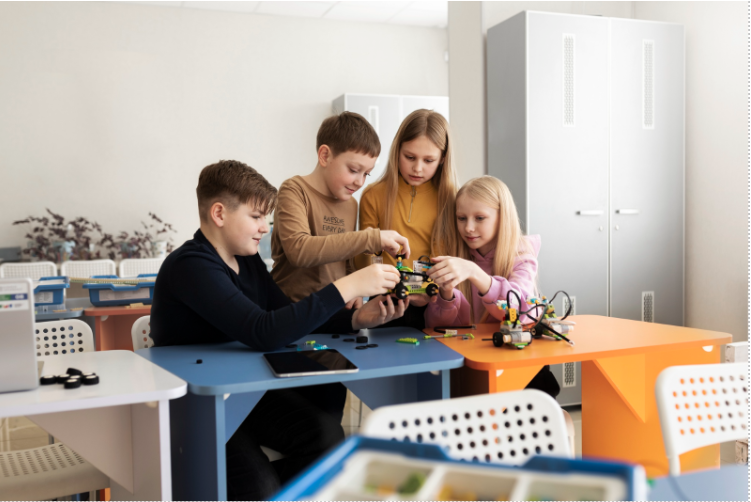


A principal once asked whether buying a robotics kit meant the school had “done the AI thing” too. It hadn’t, and the confusion is easy to understand. Marketing, news coverage and even some school documents use the two words as if they meant the same thing. AI vs robotics is not a contest, though. They are two different fields that overlap in places, and knowing where one stops and the other starts is the first step in deciding what AI and robotics in schools should actually look like.
What AI Is
Ask a Grade 8 class what AI is, and you’ll hear “chatbots” first, then “robots” from the back row. One guess is close, the other isn’t. AI is a program that gets better at a task by studying examples instead of being handed every rule. Show it ten thousand photos of cats and dogs, and it works out the difference by itself. No machine attached. Just code, data and a lot of maths humming away somewhere out of sight.
What Robotics Is
Robotics is the part you can kick. Motors, wheels, a battery pack, sensors taped on with more optimism than skill. A robot’s whole job is to notice something and do something about it: see the line, turn left; feel the wall, back up. Most school robots manage that with a few plain rules a student typed in one afternoon. Nothing in there is learning anything. It still counts as robotics.
Where They Overlap
Bolt a camera onto that robot, teach it with examples what a red ball looks like, and suddenly you have both. Some real versions:
- An arm that picks the ripe fruit and leaves the green
- A cart that works out its own way round the furniture instead of being told
- A build that spots a raised hand and waves back
These are still fairly rare in classrooms, and usually a later-years project. So keep the picture simple: the difference between AI and robotics is that one is a body and the other is one way of running its brain.
Common Misconceptions
What people say | What is actually true |
Every robot uses AI | Most school-level robots run on fixed, pre-written rules |
AI needs a robot to be real | Most AI work happens entirely in software |
Robotics is only for future engineers | It draws on maths, design and coding as well |
A school has to pick one | Many schools stage them one after the other |
Core Differences
Set side by side, AI vs robotics looks like this:
| AI | Robotics |
What it is | Software that learns and predicts | Machines that sense and act |
Physical form | Not required | Central to the field |
Main skills | Data handling, Python, statistics | Electronics, mechanics, embedded code |
Typical output | A prediction or decision | A physical movement or action |
Progress feels like | Numbers improving on a screen | Something visibly working or failing |
That last row matters more than it looks. Robotics vs artificial intelligence often comes down to what kind of feedback keeps a particular student engaged.
Skills Each One Builds
The skills side of AI vs robotics is where students often find their own fit.
What AI Builds
- Comfort with messy, incomplete data
- Statistical thinking
- Reasoning about uncertainty, including when a model is probably wrong
What Robotics Builds
- Physical troubleshooting
- Reading circuits and wiring diagrams
- Patience when a connection fails for the third time
What Both Build
Structured problem-solving, and the habit of testing an idea instead of assuming it works.
Tools
Tool choice is another place where robotics vs artificial intelligence pull apart.
| Common beginner tools | Common intermediate tools |
AI | Teachable Machine, Scratch extensions | Python, scikit-learn, TensorFlow |
Robotics | Block-coded kits, micro:bit | Arduino, Raspberry Pi, sensor modules |
Project Ideas
Beginner Projects
- AI: sort photos into two groups using a no-code tool
- Robotics: build something that moves using block coding
Intermediate Projects
- AI: predict an outcome from a small spreadsheet, such as exam scores against hours studied
- Robotics: a line-following robot with two sensors and a simple control loop
Combined Projects
- A small sorting machine that uses a trained image classifier to decide where each object goes
- A robot that recognises a colour or shape before it acts
In AI vs robotics for students, combined projects tend to be the ones they remember, since an abstract idea ends up moving something in front of them.
Grade Suitability
Thinking about AI vs robotics for students by age helps avoid handing out work that is too hard or too easy.
Grade band | Better fit | Why |
3 to 5 | Robotics basics, unplugged logic games | Physical, visual and low on syntax |
6 to 8 | Block-based robotics, first AI tools with no code | Builds confidence before real coding |
9 to 10 | Python, simple ML projects, sensor-based robots | Students can handle abstraction |
11 to 12 | Combined projects, independent inquiry | Enough grounding to design their own problem |
Infrastructure and Curriculum Fit
Space and Hardware
- AI needs: computers, a reliable connection, and cloud accounts for heavier work
- Robotics needs: physical space, storage for parts, and a budget for things that wear out
That single difference shapes school budgets more than anything else on this page.
Fit With Existing Subjects
Field | Pairs naturally with |
AI | Computer science, mathematics, statistics |
Robotics | Physics, design and technology, basic electronics |
Either can be folded into a timetable that already exists, and both are easier to defend when they clearly support core subjects.
When Each One Fits
The AI vs robotics choice usually settles itself once a school looks honestly at its students, space and staff.
When AI Fits
- Students are drawn to data, patterns and software more than building things
- The school has limited space or storage
- Staff are stronger in computing than in mechanics
When Robotics Fits
- Students learn best by handling and building
- Younger grades need something tactile before abstract coding
- There is room for parts, a workbench and a bit of mess
When Both Fit
- Trained staff are available for each
- A timetable slot exists and is likely to survive the year
- Students already have some coding comfort
The Combined Approach
Choosing between the two is often the wrong question, and AI vs robotics stops feeling like an either-or once a school plans them as a sequence. AI and robotics in education work well in stages, with physical building first and AI concepts layered on once students are comfortable.
Stage | Focus | Why it sits here |
1 | Physical building, block coding | Builds intuition before abstraction |
2 | Sensors and text-based coding | Adds real cause and effect |
3 | AI concepts with simple tools | Data literacy on top of coding comfort |
4 | Combined projects | Students design their own problem |
A school with the staff time and space can aim for the overlap eventually, where the most interesting student work tends to happen. A school with less capacity can start with one and add the other later.
Quick Decision Guide
A shortcut for the AI vs robotics decision, based on what a school already has:
If your school… | Lean toward |
Has limited space and strong computing staff | AI first |
Has room, younger grades and hands-on learners | Robotics first |
Has both staff and space | A staged combination |
Is still unsure | One grade band, one field, reviewed after a term |
Where Makers’ Muse Fits In
Makers’ Muse supports AI and robotics in schools as one connected pathway, so students can move between building and data work as their skills develop, and the AI vs robotics decision does not have to be locked in on day one.
FAQs
No. The difference between AI and robotics is that they are separate fields that overlap. Most robots run on pre-written logic, and AI is only one way to make a machine behave intelligently.
Neither is easier in general. Robotics feels more rewarding early on because progress is visible, while AI progress often stays on a screen for longer.
Yes. Many schools bring in AI and robotics in education in stages, beginning with robotics in the middle grades and adding AI once students are ready for real coding.
A small sorting robot that uses a simple trained image classifier to recognise colour or shape is achievable for most secondary students.
Not at the start. Block-based tools let younger students build and experiment before any text-based code appears.