

Overview
This project is about a rain sensor alarm this project will help you to find out whether it will rain or not if rain comes the buzzer will give you an alarm to tell you that it’s raining outside.
In this rain sensor alarm red LED and buzzer will tell that rain is coming yellow LED will predict that rain can come and the green LED will tell that there is no chance of rain.
Hardware required
- Arduino Uno R3
- Resistor
- Jumper Wires
- Temperature Sensor
- Breadboard
- Buzzer
- Led’s
Schematic Diagram
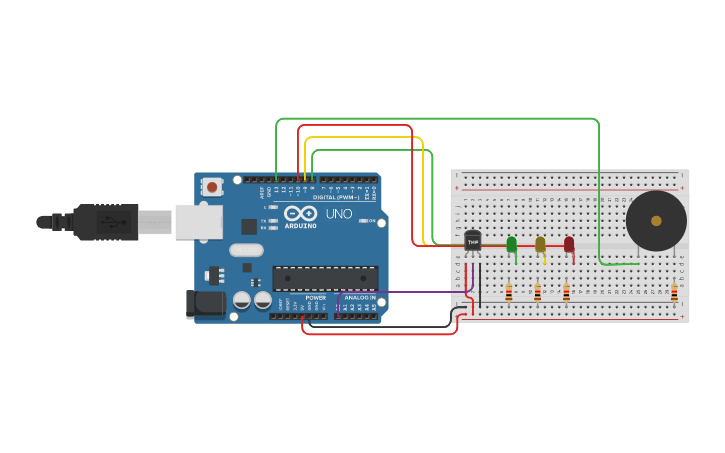
Fig 1. Circuit Diagram
Arduino Code :
#define sensorPin  A0
#define greenLED 8
#define yellowLED 9
#define redLED 10

void setup()
{
  pinMode(greenLED, OUTPUT);
  pinMode(yellowLED, OUTPUT);
  pinMode(redLED, OUTPUT);
  Serial.begin(9600);
}

void loop()
{
  int reading = analogRead(sensorPin);
  float voltage = reading * 5.0;
  voltage /= 1024.0;
  float temperatureC = (voltage - 0.5) * 100 ;
  float temperatureF = (temperatureC * 9.0 / 5.0) + 32.0;

  Serial.print(voltage); Serial.print(" volts  -  ");
  Serial.print(temperatureC); Serial.print(" degrees C  -  ");
  Serial.print(temperatureF); Serial.println(" degrees F");

  if (temperatureF >= 80){
    digitalWrite(greenLED, LOW);
    digitalWrite(yellowLED, LOW);
    digitalWrite(redLED, HIGH);
    tone(13,4000,100);
    tone(13,500,100);
    tone(13,4000,100);
    tone(13,500,100);
    tone(13,4000,100);

  }
else if (temperatureF >= 60 && temperatureF <=78){
    digitalWrite(greenLED, LOW);
    digitalWrite(yellowLED, HIGH);
    digitalWrite(redLED, LOW);
    noTone(13);

  }
  if (temperatureF >= 50  && temperatureF <=60){
    digitalWrite(greenLED, HIGH);
    digitalWrite(yellowLED, LOW);
    digitalWrite(redLED, LOW);
    noTone(13);
  }
  delay(500);
  }
Precautions
- Connections should be done properly.
- Arduino is case Sensitive so code accordingly.
- Give different and appropriate colors to the wires.
- Use resistors for sensors and LCDs.